

Overview
Tools are capabilities the agent can invoke during a conversation. Some tools require your approval before executing (marked with 🔒). Some tool schemas are deferred. The active harness exposes eitherload_tools or native tool_search as the loader and names the required call
in the system prompt. Loading only makes a schema callable on the next model
step; it does not execute the tool or bypass approvals.
Use Settings → Tools to search the live catalog and choose Approve,
Ask, or Deny for each capability:
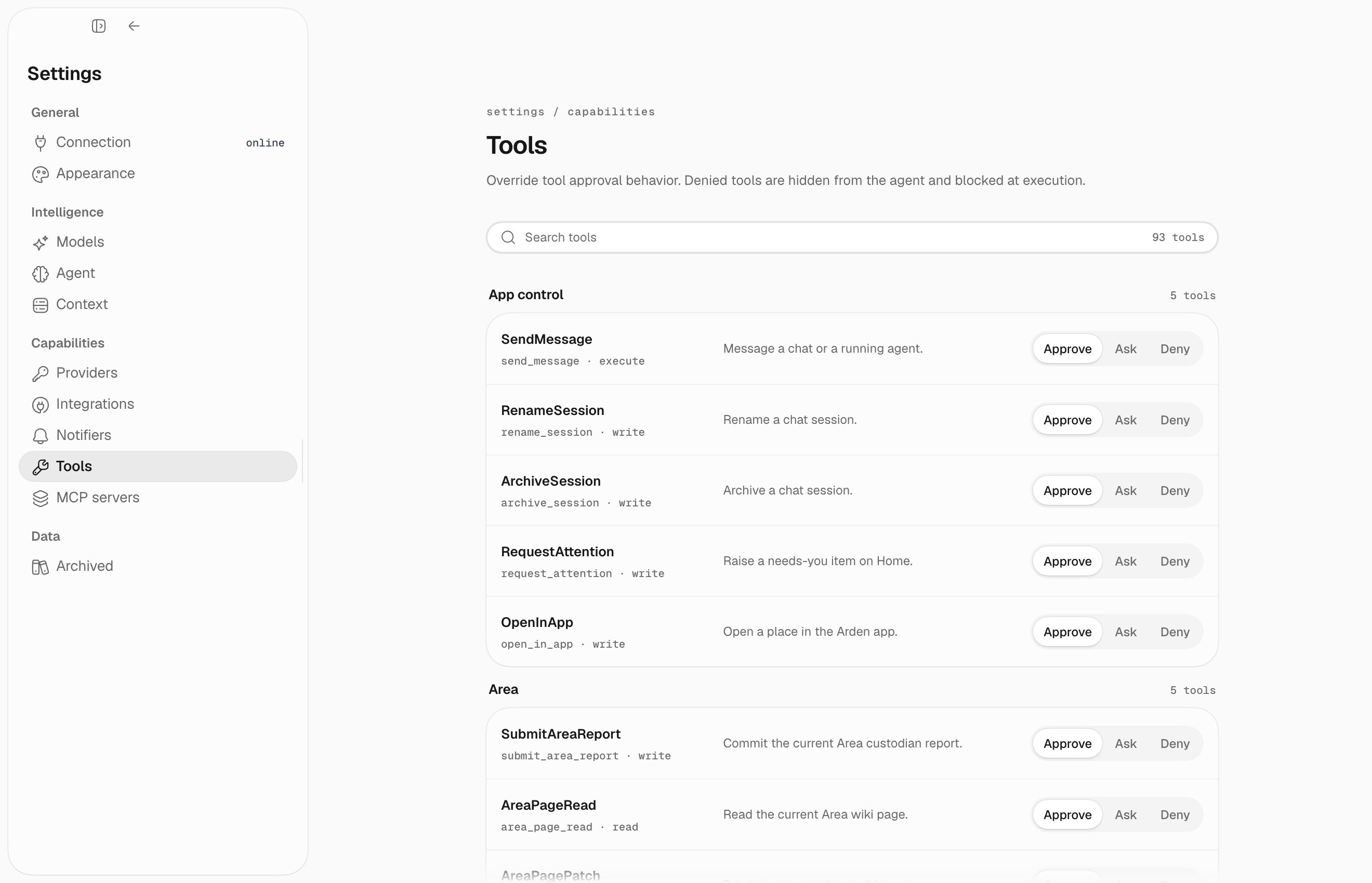
System & files
File write tools and
directives_set are deferred. The background tool can start new background work immediately; the background deferred group is only for listing, reading, or canceling existing background tasks.
email.
Calendar
Requires Google Calendar to be connected. Deferred group:calendar.
Google Drive
Requires Google Drive to be connected. Deferred group:google_drive.
Facts
Facts are the canonical, source-backed correctness layer. Change them through an exact plan and commit; do not use a generic memory-record mutation tool.fact_plan_changes returns the preview and plan_id; fact_commit_changes
accepts only that plan_id. The server derives authority and provenance from
the active session and Area.
Wiki
Wiki pages are the readable, managed projection. Read before writing, then use semantic page arguments; the backend enforces concurrency. On a conflict, reread and retry. Scheduled automations can use generic writes only belowautomations/; generated publishing remains reserved for an explicit owner.
This group is deferred: load it with load_tools(group="wiki").
Web
Web search usesWEB_SEARCH mode (auto, exa, ddgs, none). EXA_API_KEY is only required when mode resolves to Exa.
Slack
Requires Slack to be connected. Deferred group:slack.
Automations
Deferred group:automations.
Runtime state
App control
Available only when the active session has app-control capability.
These are mostly internal coordination tools. The desktop app exposes the visible results as todos, channels, session history, and status updates.
Background tasks
Deferred group:background.
Agents are spawned with the always-available
background tool, which returns the
agent’s own session id. Results are delivered back into the parent chat automatically;
use session_read to inspect an agent’s work and session_send_message to steer it.
Notifications
Deferred group:notifications.
MCP tools
Connected MCP server tools are deferred by server. Useload_tools(group="mcp:<server>"), for example load_tools(group="mcp:obsidian"). MCP tools still keep their own approval/mutation behavior after loading.
MCP tools default to conservative external execution: approval required. Per-tool config can override that with tool_policies.<tool_name>. If a server is trusted, trust_tool_annotations=true lets Arden use MCP Tool.annotations hints such as readOnlyHint and destructiveHint; explicit tool_policies still win.
Canonical workflows
Follow the same sequence for source-of-truth work: search → inspect → preview → mutate → verify. Never invent IDs; pass stable refs returned by the previous tool.Bounded file edit
- Find candidates with
file_findorfile_search_text; ifhas_moreis true, narrow the query or continue with its cursor. file_read(path, offset, limit)the exact region and retain its revision.- Call
file_editorfile_writewith that revision. The approval card shows the diff before the write. - Treat
write_conflict,not_found, andpermission_deniedas terminal for that attempt; followrecovery_action, re-read, and create a new preview. - Verify the returned
after_refby reading the file again. Large results provide a durableraw_refrather than disappearing at truncation.
Slack and Gmail mutation
- Load
slackoremail, search with a boundedlimit, and continue only when the result says more may exist. - Inspect the selected message/thread. Use its exact
source_refs[].ref(channel:timestampfor Slack,account:message_idfor Gmail). - Draft the post, send, or reply; provide a stable
idempotency_key. Approval shows the destination and bounded body preview. - A successful mutation returns an effect, provider receipt, and
after_ref; an uncertain result says to verify provider state before retrying. - Read the returned ref to verify. For Gmail replies,
email_replypreservesIn-Reply-To,References, and GmailthreadId.
MCP recovery
- Load the exact server group with
load_tools(group="mcp:<server>"); loading never executes a tool. - Inspect the lossless schema and annotations. Bound list arguments and use refs from earlier results.
- Preview and approve external mutations unless an explicit policy says otherwise.
- On
tool_not_loaded, load the named group; onmcp_error, follow its recovery action. Do not retry uncertain mutations without checking state. - Preserve returned
source_refs,raw_ref, receipts, and verification data for downstream calls.
Deferred loading examples
Skills
Obsidian should be connected as an MCP server and loaded with
load_tools(group="mcp:obsidian") when needed.
Approval flow
When a tool requires approval, the desktop app shows an approval card with the tool name, arguments, preview, and options to approve or reject the call. Session/tool-specific policy overrides can skip repeated approvals when you explicitly configure them. Settings → Tools can override individual tools:Per-automation tool scoping
Every automation carries a tool scope: a named contract bounding what its runs may touch, applied as a hard outer gate before any other selection. The automation stores only the scope’s name. The contract itself is written in Arden’s code, so no stored value pins a tool name and renaming a tool cannot quietly narrow a saved scope. You and the agent choose between exactly two:
Through the API this is the
tool_scope field; the agent sets it with
all_tools on automation_create. Nothing else is selectable — an automation
cannot be handed a hand-written list of tool names by you or by a model.
The remaining scopes are contracts Arden assigns from code and cannot be set
from outside:
This is how area agents stay observe-only: they read anything and tend their own
topic page, but take no external action. Area custodians finish by calling
area_submit_report. Invalid or stale reports return a tool error inside the
same agent loop, so the custodian can correct the report before the automation
is allowed to settle.
User-defined tools
Create custom tools in~/.arden/tools/. Each file exports a tools mapping. Inputs must be bounded, failures typed, and stable results sourced:
policy=ToolPolicy(..., requires_approval=True) plus an approval= function for tools that change source-of-truth state. Use permissions=frozenset({...}) to hide a tool unless a service is configured. Restart the server after adding or changing user tools.