> ## Documentation Index
> Fetch the complete documentation index at: https://arden.timganiev.com/llms.txt
> Use this file to discover all available pages before exploring further.
# Tools
> Core tools and integration capabilities available to the Arden agent.
## Overview
Tools are capabilities the agent can invoke during a conversation. Some tools require your approval before executing (marked with 🔒).
Some tool schemas are **deferred**. The active harness exposes either
`load_tools` or native `tool_search` as the loader and names the required call
in the system prompt. Loading only makes a schema callable on the next model
step; it does not execute the tool or bypass approvals.
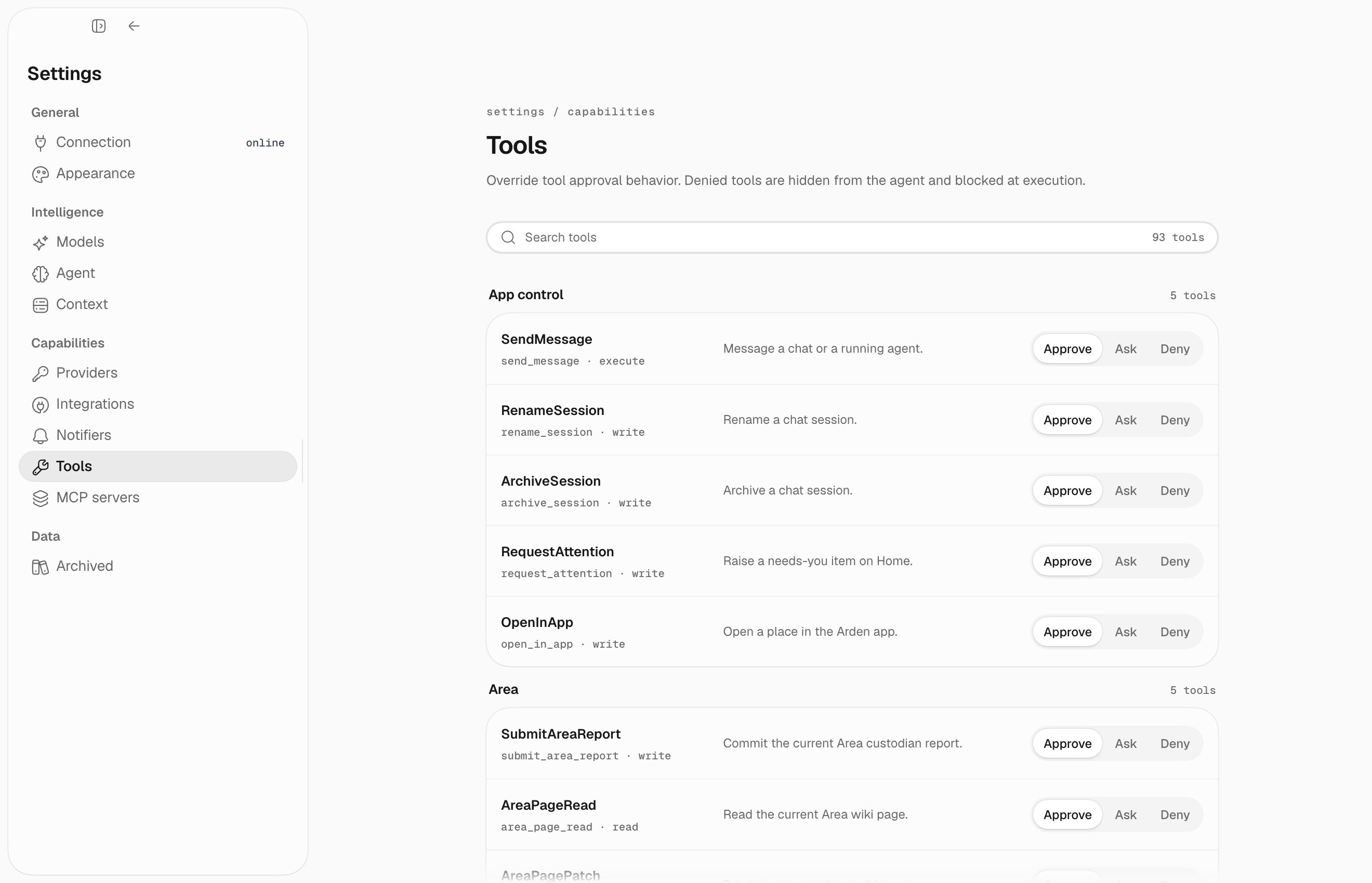
Use **Settings → Tools** to search the live catalog and choose **Approve**,
**Ask**, or **Deny** for each capability:
 ## System & files
| Tool | Description | Approval |
| --------------------------------------------------------- | ---------------------------------------------------------------------------- | --------------------- |
| `bash` | Execute shell commands | 🔒 Dangerous commands |
| `read_file` / `list_files` / `find_files` / `search_text` | Inspect local files without editing them | – |
| `write_file` / `edit_file` | Create or modify local files | 🔒 |
| `current_time` | Get current date and time | – |
| `research` | Spawn a research agent with all read-only tools (`depth`: quick/normal/deep) | – |
| `workflow` | Run a curated built-in multi-agent workflow | – |
| `background` | Spawn an autonomous background agent for long-running tasks | – |
| `render_html` | Render a sandboxed rich card in desktop chat (`display` or `input` mode) | – |
| `load_tools` | Load deferred tool schemas by group or exact name | – |
| `tool_search` | Find and load exact deferred tools in native-search runs | – |
| `request_connection` | Ask you to connect one required registered integration | – |
| `get_directives` | Read persistent behavioral directives | – |
| `set_directives` | Update persistent behavioral directives | 🔒 |
File write tools and `set_directives` are deferred. The `background` tool can start new background work immediately; the `background` deferred group is only for listing, reading, or canceling existing background tasks.
## Email
Requires Gmail to be connected.
Deferred group: `email`.
| Tool | Description | Approval |
| ------------- | ------------------------------------------------------------- | -------- |
| `emails` | Search and list emails | – |
| `read_email` | Read full email content | – |
| `send_email` | Send an email | 🔒 |
| `reply_email` | Reply in an existing thread by qualified `account:message_id` | 🔒 |
## Calendar
Requires Google Calendar to be connected.
Deferred group: `calendar`.
| Tool | Description | Approval |
| ----------------------- | ---------------------- | -------- |
| `calendar` | Search and list events | – |
| `create_calendar_event` | Create an event | 🔒 |
| `edit_calendar_event` | Edit an event | 🔒 |
| `delete_calendar_event` | Delete an event | 🔒 |
## Google Drive
Requires Google Drive to be connected.
Deferred group: `google_drive`.
| Tool | Description | Approval |
| -------------------------------------------------- | --------------------------------- | -------- |
| `search_google_drive` | Search Docs and Sheets | – |
| `read_google_doc` | Read a Google Doc | – |
| `read_google_sheet` | Read a bounded A1 range | – |
| `create_google_doc` / `create_google_sheet` | Create an empty document or sheet | 🔒 |
| `edit_google_doc` | Append to or replace exact text | 🔒 |
| `update_google_sheet` / `append_google_sheet_rows` | Write cells or append rows | 🔒 |
## Facts
Facts are the canonical, source-backed correctness layer. Change them through
an exact plan and commit; do not use a generic memory-record mutation tool.
| Tool | Description | Approval |
| ---------------------- | ------------------------------------------------------------------------------------------------------- | -------- |
| `search_facts` | Search visible canonical facts; returns stable `fact_id` values. | – |
| `get_fact` | Read one fact, including lifecycle and saved provenance. | – |
| `get_fact_history` | Read a fact's immutable event history and provenance. | – |
| `get_due_fact_reviews` | List facts due for evidence-based review. | – |
| `plan_fact_changes` | Validate creates, reviews, amendments, supersessions, expiries, or retractions without publishing them. | – |
| `commit_fact_changes` | Commit one exact returned plan if its facts remain unchanged. | – |
`plan_fact_changes` returns the preview and `plan_id`; `commit_fact_changes`
accepts only that `plan_id`. The server derives authority and provenance from
the active session and Area.
## Wiki
Wiki pages are the readable, managed projection. Read before writing, then use
semantic page arguments; the backend enforces concurrency. On a conflict,
reread and retry. Scheduled automations can use generic writes only below
`automations/`; generated publishing remains reserved for an explicit owner.
This group is deferred: load it with `load_tools(group="wiki")`.
| Tool | Description | Approval |
| ------------------------ | ------------------------------------------------------------------------------ | -------- |
| `list_wiki_pages` | List active pages and direct child directories in one managed directory. | – |
| `read_wiki_page` | Read one active page by exact managed path. | – |
| `wiki_links` | Read a page's outgoing links and backlinks. | – |
| `create_wiki_page` | Create one common page from its path, title, and body. | 🔒 |
| `edit_wiki_page` | Replace one page body by its exact managed path. | 🔒 |
| `archive_wiki_page` | Recoverably archive one page by its exact managed path. | 🔒 |
| `move_wiki_page` | Move one page by its exact managed path and rewrite its wiki links atomically. | 🔒 |
| `publish_wiki_generated` | Update one automation-owned section without touching the rest of its page. | 🔒 |
## Web
Web search uses `WEB_SEARCH` mode (`auto`, `exa`, `ddgs`, `none`). `EXA_API_KEY` is only required when mode resolves to Exa.
| Tool | Description | Approval |
| ------------ | ------------------------ | -------- |
| `web_search` | Search the web | – |
| `web_fetch` | Fetch content from a URL | – |
## Slack
Requires Slack to be connected.
Deferred group: `slack`.
| Tool | Description | Approval |
| -------------------- | ---------------------------------------------------- | -------- |
| `slack_search` | Search Slack messages | – |
| `slack_channel` | Read recent channel history | – |
| `slack_thread` | Read a message thread | – |
| `slack_channels` | List accessible channels | – |
| `slack_dms` | List open direct messages | – |
| `slack_dm` | Read a direct message conversation | – |
| `slack_users` | Search workspace members | – |
| `slack_user` | Read a user profile | – |
| `slack_file` | Read a Slack file or image by its returned reference | – |
| `slack_post_message` | Post a message | 🔒 |
| `slack_post_blocks` | Post Block Kit content | 🔒 |
## Automations
Deferred group: `automations`.
| Tool | Description | Approval |
| ----------------------- | ----------------------------------------------------------- | -------- |
| `create_automation` | Schedule a task | 🔒 |
| `create_loop` | Start an in-chat recurring loop | 🔒 |
| `schedule_wakeup` | Schedule a one-off wakeup into the current session | 🔒 |
| `loop_done` | Stop the current loop after its completion condition is met | 🔒 |
| `list_automations` | List all automations | – |
| `update_automation` | Modify an automation | 🔒 |
| `delete_automation` | Remove an automation | 🔒 |
| `run_automation` | Trigger immediate run | 🔒 |
| `get_automation_result` | Get last run result | – |
## Runtime state
| Tool | Description | Approval |
| -------------------------------------------------------------- | ------------------------------------------------ | --------------- |
| `update_todos` | Update the visible task list for complex work | – |
| `get_goal` | Read the active durable session goal | – |
| `complete_goal` | Mark the active goal complete after verification | – |
| `block_goal` | Mark the active goal blocked on missing input | – |
| `create_session` | Create a new chat/channel session | – |
| `list_recent_sessions` / `read_session` / `search_transcripts` | Inspect readable chat history | – |
| `send_message` | Message a chat, or steer an agent you spawned | 🔒 (chats only) |
## App control
Available only when the active session has app-control capability.
| Tool | Description | Approval |
| ------------------- | -------------------------------------------- | -------- |
| `rename_session` | Rename a chat or agent session | 🔒 |
| `archive_session` | Archive finished sessions | 🔒 |
| `request_attention` | Add a needs-you item to Home | 🔒 |
| `open_in_app` | Open a supported resource in the desktop app | 🔒 |
These are mostly internal coordination tools. The desktop app exposes the visible results as todos, channels, session history, and status updates.
## Background tasks
Deferred group: `background`.
| Tool | Description | Approval |
| -------------- | -------------------------------------------- | -------- |
| `cancel_agent` | Stop an agent you spawned, by its session id | 🔒 |
Agents are spawned with the always-available `background` tool, which returns the
agent's own session id. Results are delivered back into the parent chat automatically;
use `read_session` to inspect an agent's work and `send_message` to steer it.
## Notifications
Deferred group: `notifications`.
| Tool | Description | Approval |
| -------- | ------------------- | -------- |
| `notify` | Send a notification | 🔒 |
## MCP tools
Connected MCP server tools are deferred by server. Use `load_tools(group="mcp:")`, for example `load_tools(group="mcp:obsidian")`. MCP tools still keep their own approval/mutation behavior after loading.
MCP tools default to conservative external execution: approval required. Per-tool config can override that with `tool_policies.`. If a server is trusted, `trust_tool_annotations=true` lets Arden use MCP `Tool.annotations` hints such as `readOnlyHint` and `destructiveHint`; explicit `tool_policies` still win.
## Canonical workflows
Follow the same sequence for source-of-truth work: **search → inspect → preview → mutate → verify**. Never invent IDs; pass stable refs returned by the previous tool.
### Bounded file edit
1. Find candidates with `find_files` or `search_text`; if `has_more` is true, narrow the query or continue with its cursor.
2. `read_file(path, offset, limit)` the exact region and retain its revision.
3. Call `edit_file` or `write_file` with that revision. The approval card shows the diff before the write.
4. Treat `write_conflict`, `not_found`, and `permission_denied` as terminal for that attempt; follow `recovery_action`, re-read, and create a new preview.
5. Verify the returned `after_ref` by reading the file again. Large results provide a durable `raw_ref` rather than disappearing at truncation.
### Slack and Gmail mutation
1. Load `slack` or `email`, search with a bounded `limit`, and continue only when the result says more may exist.
2. Inspect the selected message/thread. Use its exact `source_refs[].ref` (`channel:timestamp` for Slack, `account:message_id` for Gmail).
3. Draft the post, send, or reply; provide a stable `idempotency_key`. Approval shows the destination and bounded body preview.
4. A successful mutation returns an effect, provider receipt, and `after_ref`; an uncertain result says to verify provider state before retrying.
5. Read the returned ref to verify. For Gmail replies, `reply_email` preserves `In-Reply-To`, `References`, and Gmail `threadId`.
### MCP recovery
1. Load the exact server group with `load_tools(group="mcp:")`; loading never executes a tool.
2. Inspect the lossless schema and annotations. Bound list arguments and use refs from earlier results.
3. Preview and approve external mutations unless an explicit policy says otherwise.
4. On `tool_not_loaded`, load the named group; on `mcp_error`, follow its recovery action. Do not retry uncertain mutations without checking state.
5. Preserve returned `source_refs`, `raw_ref`, receipts, and verification data for downstream calls.
## Deferred loading examples
| Need | Load call |
| ------------------------------------ | ----------------------------------- |
| Search Gmail | `load_tools(group="email")` |
| Read or edit calendar | `load_tools(group="calendar")` |
| Search Slack | `load_tools(group="slack")` |
| Browse or publish managed wiki pages | `load_tools(group="wiki")` |
| Manage automations | `load_tools(group="automations")` |
| Spawn or inspect background work | `load_tools(group="background")` |
| Send a notification | `load_tools(group="notifications")` |
| Update standing directives | `load_tools(group="directives")` |
| Use an MCP server | `load_tools(group="mcp:")` |
## Skills
| Tool | Description | Approval |
| -------------- | --------------------------------------------- | -------- |
| `use_skill` | Activate a skill for specialized instructions | – |
| `create_skill` | Save an approved reusable global skill | 🔒 |
Obsidian should be connected as an MCP server and loaded with `load_tools(group="mcp:obsidian")` when needed.
## Approval flow
When a tool requires approval, the desktop app shows an approval card with the tool name, arguments, preview, and options to approve or reject the call. Session/tool-specific policy overrides can skip repeated approvals when you explicitly configure them.
Settings → Tools can override individual tools:
| Override | Behavior |
| -------- | ------------------------------------------------ |
| Default | Use the tool's policy |
| Approve | Expose the tool and skip approval |
| Ask | Expose the tool and require approval |
| Deny | Hide the tool from the agent and block execution |
## Per-automation tool scoping
An automation can carry a **tool scope**: an allowlist of tool-name patterns that bounds what its runs may touch, applied as a hard outer gate before any other selection. Patterns are `*` (everything), an exact name, or a `prefix*` wildcard.
```json theme={null}
"tool_scope": ["search_facts", "get_fact", "get_fact_history", "list_wiki_pages", "read_wiki_page", "wiki_links", "web_search"]
```
This is how [area agents](/guides/areas) stay observe-only: they get bounded
fact and wiki reads, but no fact commits, generated-page publishing, or external
actions. A missing scope gives an automation only the read-only floor. Use
`"*"` only when unrestricted tool access is intentional.
Area custodians finish by calling `submit_area_report`. Invalid or stale reports
return a tool error inside the same agent loop, so the custodian can correct the
report before the automation is allowed to settle.
## User-defined tools
Create custom tools in `~/.arden/tools/`. Each file exports a `tools` mapping. Inputs must be bounded, failures typed, and stable results sourced:
```python theme={null}
from pydantic import BaseModel, Field
from arden.agent.types.tools import ToolSourceRef
from arden.tools.core import ToolAction, ToolPolicy, ToolResult, ToolScope, tool
from arden.tools.core.context import ToolExecution
class LookupInput(BaseModel):
query: str = Field(min_length=1, max_length=500)
limit: int = Field(default=20, ge=1, le=100)
async def lookup(execution: ToolExecution, args: LookupInput) -> ToolResult:
service = execution.ctx.services.get("catalog")
if service is None:
return ToolResult.failure(
code="not_configured",
message="Catalog is unavailable.",
preview="Unavailable",
recovery_action="Configure the catalog service and retry.",
)
rows = await service.search(args.query, limit=args.limit)
return ToolResult(
content="\n".join(row.title for row in rows),
preview=f"{len(rows)} results",
source_refs=tuple(
ToolSourceRef(provider="catalog", kind="item", ref=row.id, title=row.title)
for row in rows
),
)
tools = {
"lookup": tool(
display_name="Lookup",
description="Search the configured catalog and return stable item refs.",
input_model=LookupInput,
policy=ToolPolicy(
action=ToolAction.READ,
scope=ToolScope.INTERNAL,
permissions=frozenset({"catalog"}),
),
execute=lookup,
)
}
```
Use `policy=ToolPolicy(..., requires_approval=True)` plus an `approval=` function for tools that change source-of-truth state. Use `permissions=frozenset({...})` to hide a tool unless a service is configured. Restart the server after adding or changing user tools.
## System & files
| Tool | Description | Approval |
| --------------------------------------------------------- | ---------------------------------------------------------------------------- | --------------------- |
| `bash` | Execute shell commands | 🔒 Dangerous commands |
| `read_file` / `list_files` / `find_files` / `search_text` | Inspect local files without editing them | – |
| `write_file` / `edit_file` | Create or modify local files | 🔒 |
| `current_time` | Get current date and time | – |
| `research` | Spawn a research agent with all read-only tools (`depth`: quick/normal/deep) | – |
| `workflow` | Run a curated built-in multi-agent workflow | – |
| `background` | Spawn an autonomous background agent for long-running tasks | – |
| `render_html` | Render a sandboxed rich card in desktop chat (`display` or `input` mode) | – |
| `load_tools` | Load deferred tool schemas by group or exact name | – |
| `tool_search` | Find and load exact deferred tools in native-search runs | – |
| `request_connection` | Ask you to connect one required registered integration | – |
| `get_directives` | Read persistent behavioral directives | – |
| `set_directives` | Update persistent behavioral directives | 🔒 |
File write tools and `set_directives` are deferred. The `background` tool can start new background work immediately; the `background` deferred group is only for listing, reading, or canceling existing background tasks.
## Email
Requires Gmail to be connected.
Deferred group: `email`.
| Tool | Description | Approval |
| ------------- | ------------------------------------------------------------- | -------- |
| `emails` | Search and list emails | – |
| `read_email` | Read full email content | – |
| `send_email` | Send an email | 🔒 |
| `reply_email` | Reply in an existing thread by qualified `account:message_id` | 🔒 |
## Calendar
Requires Google Calendar to be connected.
Deferred group: `calendar`.
| Tool | Description | Approval |
| ----------------------- | ---------------------- | -------- |
| `calendar` | Search and list events | – |
| `create_calendar_event` | Create an event | 🔒 |
| `edit_calendar_event` | Edit an event | 🔒 |
| `delete_calendar_event` | Delete an event | 🔒 |
## Google Drive
Requires Google Drive to be connected.
Deferred group: `google_drive`.
| Tool | Description | Approval |
| -------------------------------------------------- | --------------------------------- | -------- |
| `search_google_drive` | Search Docs and Sheets | – |
| `read_google_doc` | Read a Google Doc | – |
| `read_google_sheet` | Read a bounded A1 range | – |
| `create_google_doc` / `create_google_sheet` | Create an empty document or sheet | 🔒 |
| `edit_google_doc` | Append to or replace exact text | 🔒 |
| `update_google_sheet` / `append_google_sheet_rows` | Write cells or append rows | 🔒 |
## Facts
Facts are the canonical, source-backed correctness layer. Change them through
an exact plan and commit; do not use a generic memory-record mutation tool.
| Tool | Description | Approval |
| ---------------------- | ------------------------------------------------------------------------------------------------------- | -------- |
| `search_facts` | Search visible canonical facts; returns stable `fact_id` values. | – |
| `get_fact` | Read one fact, including lifecycle and saved provenance. | – |
| `get_fact_history` | Read a fact's immutable event history and provenance. | – |
| `get_due_fact_reviews` | List facts due for evidence-based review. | – |
| `plan_fact_changes` | Validate creates, reviews, amendments, supersessions, expiries, or retractions without publishing them. | – |
| `commit_fact_changes` | Commit one exact returned plan if its facts remain unchanged. | – |
`plan_fact_changes` returns the preview and `plan_id`; `commit_fact_changes`
accepts only that `plan_id`. The server derives authority and provenance from
the active session and Area.
## Wiki
Wiki pages are the readable, managed projection. Read before writing, then use
semantic page arguments; the backend enforces concurrency. On a conflict,
reread and retry. Scheduled automations can use generic writes only below
`automations/`; generated publishing remains reserved for an explicit owner.
This group is deferred: load it with `load_tools(group="wiki")`.
| Tool | Description | Approval |
| ------------------------ | ------------------------------------------------------------------------------ | -------- |
| `list_wiki_pages` | List active pages and direct child directories in one managed directory. | – |
| `read_wiki_page` | Read one active page by exact managed path. | – |
| `wiki_links` | Read a page's outgoing links and backlinks. | – |
| `create_wiki_page` | Create one common page from its path, title, and body. | 🔒 |
| `edit_wiki_page` | Replace one page body by its exact managed path. | 🔒 |
| `archive_wiki_page` | Recoverably archive one page by its exact managed path. | 🔒 |
| `move_wiki_page` | Move one page by its exact managed path and rewrite its wiki links atomically. | 🔒 |
| `publish_wiki_generated` | Update one automation-owned section without touching the rest of its page. | 🔒 |
## Web
Web search uses `WEB_SEARCH` mode (`auto`, `exa`, `ddgs`, `none`). `EXA_API_KEY` is only required when mode resolves to Exa.
| Tool | Description | Approval |
| ------------ | ------------------------ | -------- |
| `web_search` | Search the web | – |
| `web_fetch` | Fetch content from a URL | – |
## Slack
Requires Slack to be connected.
Deferred group: `slack`.
| Tool | Description | Approval |
| -------------------- | ---------------------------------------------------- | -------- |
| `slack_search` | Search Slack messages | – |
| `slack_channel` | Read recent channel history | – |
| `slack_thread` | Read a message thread | – |
| `slack_channels` | List accessible channels | – |
| `slack_dms` | List open direct messages | – |
| `slack_dm` | Read a direct message conversation | – |
| `slack_users` | Search workspace members | – |
| `slack_user` | Read a user profile | – |
| `slack_file` | Read a Slack file or image by its returned reference | – |
| `slack_post_message` | Post a message | 🔒 |
| `slack_post_blocks` | Post Block Kit content | 🔒 |
## Automations
Deferred group: `automations`.
| Tool | Description | Approval |
| ----------------------- | ----------------------------------------------------------- | -------- |
| `create_automation` | Schedule a task | 🔒 |
| `create_loop` | Start an in-chat recurring loop | 🔒 |
| `schedule_wakeup` | Schedule a one-off wakeup into the current session | 🔒 |
| `loop_done` | Stop the current loop after its completion condition is met | 🔒 |
| `list_automations` | List all automations | – |
| `update_automation` | Modify an automation | 🔒 |
| `delete_automation` | Remove an automation | 🔒 |
| `run_automation` | Trigger immediate run | 🔒 |
| `get_automation_result` | Get last run result | – |
## Runtime state
| Tool | Description | Approval |
| -------------------------------------------------------------- | ------------------------------------------------ | --------------- |
| `update_todos` | Update the visible task list for complex work | – |
| `get_goal` | Read the active durable session goal | – |
| `complete_goal` | Mark the active goal complete after verification | – |
| `block_goal` | Mark the active goal blocked on missing input | – |
| `create_session` | Create a new chat/channel session | – |
| `list_recent_sessions` / `read_session` / `search_transcripts` | Inspect readable chat history | – |
| `send_message` | Message a chat, or steer an agent you spawned | 🔒 (chats only) |
## App control
Available only when the active session has app-control capability.
| Tool | Description | Approval |
| ------------------- | -------------------------------------------- | -------- |
| `rename_session` | Rename a chat or agent session | 🔒 |
| `archive_session` | Archive finished sessions | 🔒 |
| `request_attention` | Add a needs-you item to Home | 🔒 |
| `open_in_app` | Open a supported resource in the desktop app | 🔒 |
These are mostly internal coordination tools. The desktop app exposes the visible results as todos, channels, session history, and status updates.
## Background tasks
Deferred group: `background`.
| Tool | Description | Approval |
| -------------- | -------------------------------------------- | -------- |
| `cancel_agent` | Stop an agent you spawned, by its session id | 🔒 |
Agents are spawned with the always-available `background` tool, which returns the
agent's own session id. Results are delivered back into the parent chat automatically;
use `read_session` to inspect an agent's work and `send_message` to steer it.
## Notifications
Deferred group: `notifications`.
| Tool | Description | Approval |
| -------- | ------------------- | -------- |
| `notify` | Send a notification | 🔒 |
## MCP tools
Connected MCP server tools are deferred by server. Use `load_tools(group="mcp:")`, for example `load_tools(group="mcp:obsidian")`. MCP tools still keep their own approval/mutation behavior after loading.
MCP tools default to conservative external execution: approval required. Per-tool config can override that with `tool_policies.`. If a server is trusted, `trust_tool_annotations=true` lets Arden use MCP `Tool.annotations` hints such as `readOnlyHint` and `destructiveHint`; explicit `tool_policies` still win.
## Canonical workflows
Follow the same sequence for source-of-truth work: **search → inspect → preview → mutate → verify**. Never invent IDs; pass stable refs returned by the previous tool.
### Bounded file edit
1. Find candidates with `find_files` or `search_text`; if `has_more` is true, narrow the query or continue with its cursor.
2. `read_file(path, offset, limit)` the exact region and retain its revision.
3. Call `edit_file` or `write_file` with that revision. The approval card shows the diff before the write.
4. Treat `write_conflict`, `not_found`, and `permission_denied` as terminal for that attempt; follow `recovery_action`, re-read, and create a new preview.
5. Verify the returned `after_ref` by reading the file again. Large results provide a durable `raw_ref` rather than disappearing at truncation.
### Slack and Gmail mutation
1. Load `slack` or `email`, search with a bounded `limit`, and continue only when the result says more may exist.
2. Inspect the selected message/thread. Use its exact `source_refs[].ref` (`channel:timestamp` for Slack, `account:message_id` for Gmail).
3. Draft the post, send, or reply; provide a stable `idempotency_key`. Approval shows the destination and bounded body preview.
4. A successful mutation returns an effect, provider receipt, and `after_ref`; an uncertain result says to verify provider state before retrying.
5. Read the returned ref to verify. For Gmail replies, `reply_email` preserves `In-Reply-To`, `References`, and Gmail `threadId`.
### MCP recovery
1. Load the exact server group with `load_tools(group="mcp:")`; loading never executes a tool.
2. Inspect the lossless schema and annotations. Bound list arguments and use refs from earlier results.
3. Preview and approve external mutations unless an explicit policy says otherwise.
4. On `tool_not_loaded`, load the named group; on `mcp_error`, follow its recovery action. Do not retry uncertain mutations without checking state.
5. Preserve returned `source_refs`, `raw_ref`, receipts, and verification data for downstream calls.
## Deferred loading examples
| Need | Load call |
| ------------------------------------ | ----------------------------------- |
| Search Gmail | `load_tools(group="email")` |
| Read or edit calendar | `load_tools(group="calendar")` |
| Search Slack | `load_tools(group="slack")` |
| Browse or publish managed wiki pages | `load_tools(group="wiki")` |
| Manage automations | `load_tools(group="automations")` |
| Spawn or inspect background work | `load_tools(group="background")` |
| Send a notification | `load_tools(group="notifications")` |
| Update standing directives | `load_tools(group="directives")` |
| Use an MCP server | `load_tools(group="mcp:")` |
## Skills
| Tool | Description | Approval |
| -------------- | --------------------------------------------- | -------- |
| `use_skill` | Activate a skill for specialized instructions | – |
| `create_skill` | Save an approved reusable global skill | 🔒 |
Obsidian should be connected as an MCP server and loaded with `load_tools(group="mcp:obsidian")` when needed.
## Approval flow
When a tool requires approval, the desktop app shows an approval card with the tool name, arguments, preview, and options to approve or reject the call. Session/tool-specific policy overrides can skip repeated approvals when you explicitly configure them.
Settings → Tools can override individual tools:
| Override | Behavior |
| -------- | ------------------------------------------------ |
| Default | Use the tool's policy |
| Approve | Expose the tool and skip approval |
| Ask | Expose the tool and require approval |
| Deny | Hide the tool from the agent and block execution |
## Per-automation tool scoping
An automation can carry a **tool scope**: an allowlist of tool-name patterns that bounds what its runs may touch, applied as a hard outer gate before any other selection. Patterns are `*` (everything), an exact name, or a `prefix*` wildcard.
```json theme={null}
"tool_scope": ["search_facts", "get_fact", "get_fact_history", "list_wiki_pages", "read_wiki_page", "wiki_links", "web_search"]
```
This is how [area agents](/guides/areas) stay observe-only: they get bounded
fact and wiki reads, but no fact commits, generated-page publishing, or external
actions. A missing scope gives an automation only the read-only floor. Use
`"*"` only when unrestricted tool access is intentional.
Area custodians finish by calling `submit_area_report`. Invalid or stale reports
return a tool error inside the same agent loop, so the custodian can correct the
report before the automation is allowed to settle.
## User-defined tools
Create custom tools in `~/.arden/tools/`. Each file exports a `tools` mapping. Inputs must be bounded, failures typed, and stable results sourced:
```python theme={null}
from pydantic import BaseModel, Field
from arden.agent.types.tools import ToolSourceRef
from arden.tools.core import ToolAction, ToolPolicy, ToolResult, ToolScope, tool
from arden.tools.core.context import ToolExecution
class LookupInput(BaseModel):
query: str = Field(min_length=1, max_length=500)
limit: int = Field(default=20, ge=1, le=100)
async def lookup(execution: ToolExecution, args: LookupInput) -> ToolResult:
service = execution.ctx.services.get("catalog")
if service is None:
return ToolResult.failure(
code="not_configured",
message="Catalog is unavailable.",
preview="Unavailable",
recovery_action="Configure the catalog service and retry.",
)
rows = await service.search(args.query, limit=args.limit)
return ToolResult(
content="\n".join(row.title for row in rows),
preview=f"{len(rows)} results",
source_refs=tuple(
ToolSourceRef(provider="catalog", kind="item", ref=row.id, title=row.title)
for row in rows
),
)
tools = {
"lookup": tool(
display_name="Lookup",
description="Search the configured catalog and return stable item refs.",
input_model=LookupInput,
policy=ToolPolicy(
action=ToolAction.READ,
scope=ToolScope.INTERNAL,
permissions=frozenset({"catalog"}),
),
execute=lookup,
)
}
```
Use `policy=ToolPolicy(..., requires_approval=True)` plus an `approval=` function for tools that change source-of-truth state. Use `permissions=frozenset({...})` to hide a tool unless a service is configured. Restart the server after adding or changing user tools.