> ## Documentation Index
> Fetch the complete documentation index at: https://arden.timganiev.com/llms.txt
> Use this file to discover all available pages before exploring further.
# Areas
> Keep a life domain, its current outcome, and its standing agent in one place.
## What an area is
An area is a domain you want Arden to keep watching, such as health, a job
search, research, or a side project.
Each area can have:
* one attached wiki page for durable context
* one current outcome with success criteria
* a standing agent that checks the area on a schedule
* requests that need your answer, review, or attention
Create one from **Command → New area**. You can use an area without a standing
agent. Attach a wiki page before enabling one.
 ## Home
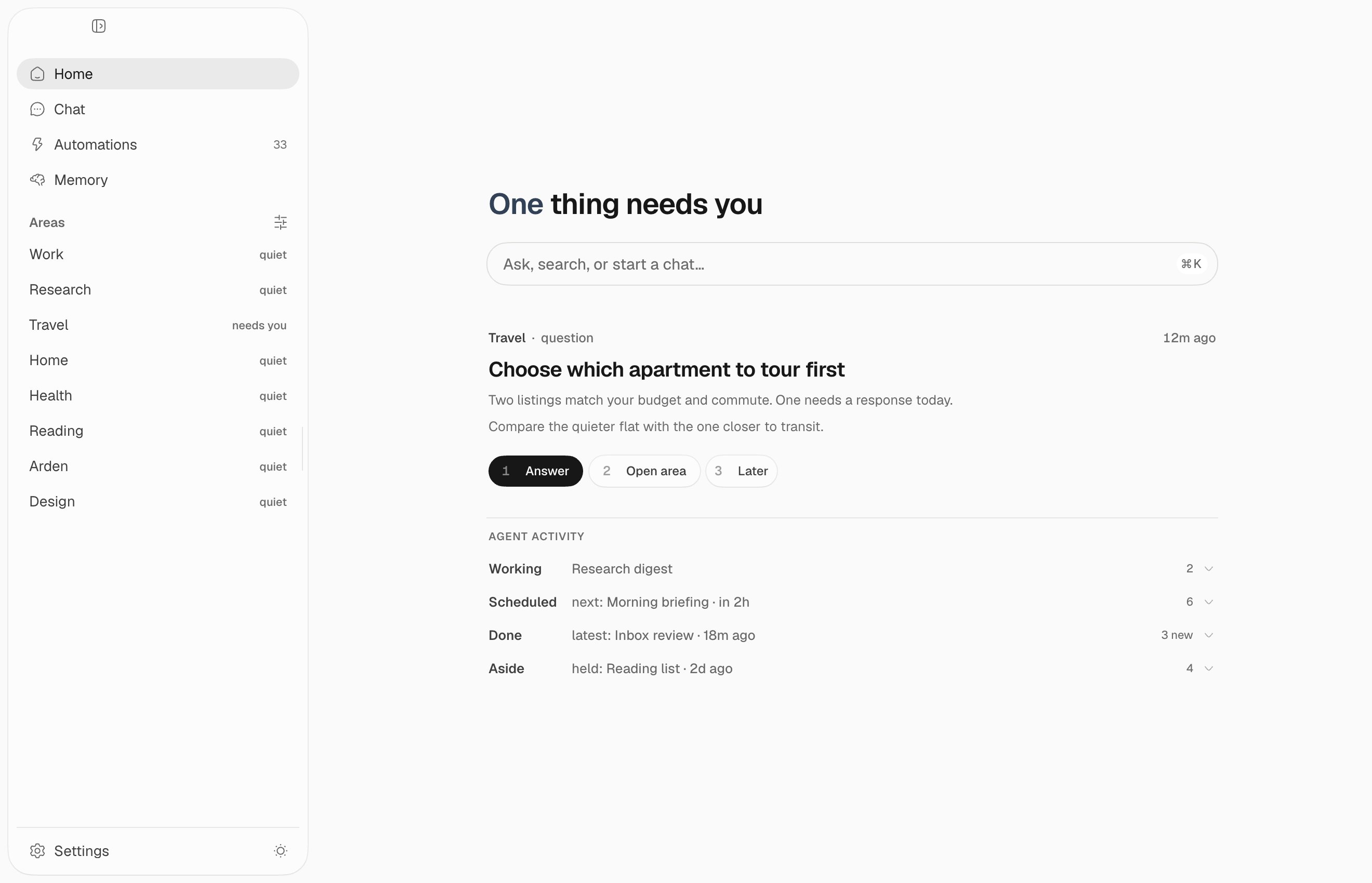
Home is your mission control:
* **Ask, search, or start a chat** opens a new conversation.
* Requests that need you appear first.
* **Agent Activity** separates work that is running, scheduled, done, or set
aside.
* Your areas stay in the sidebar with their current status.
A quiet area is healthy. Arden should interrupt you only when it needs a
decision or finds something important.
## Area room
Open an area from the sidebar:
## Home
Home is your mission control:
* **Ask, search, or start a chat** opens a new conversation.
* Requests that need you appear first.
* **Agent Activity** separates work that is running, scheduled, done, or set
aside.
* Your areas stay in the sidebar with their current status.
A quiet area is healthy. Arden should interrupt you only when it needs a
decision or finds something important.
## Area room
Open an area from the sidebar:
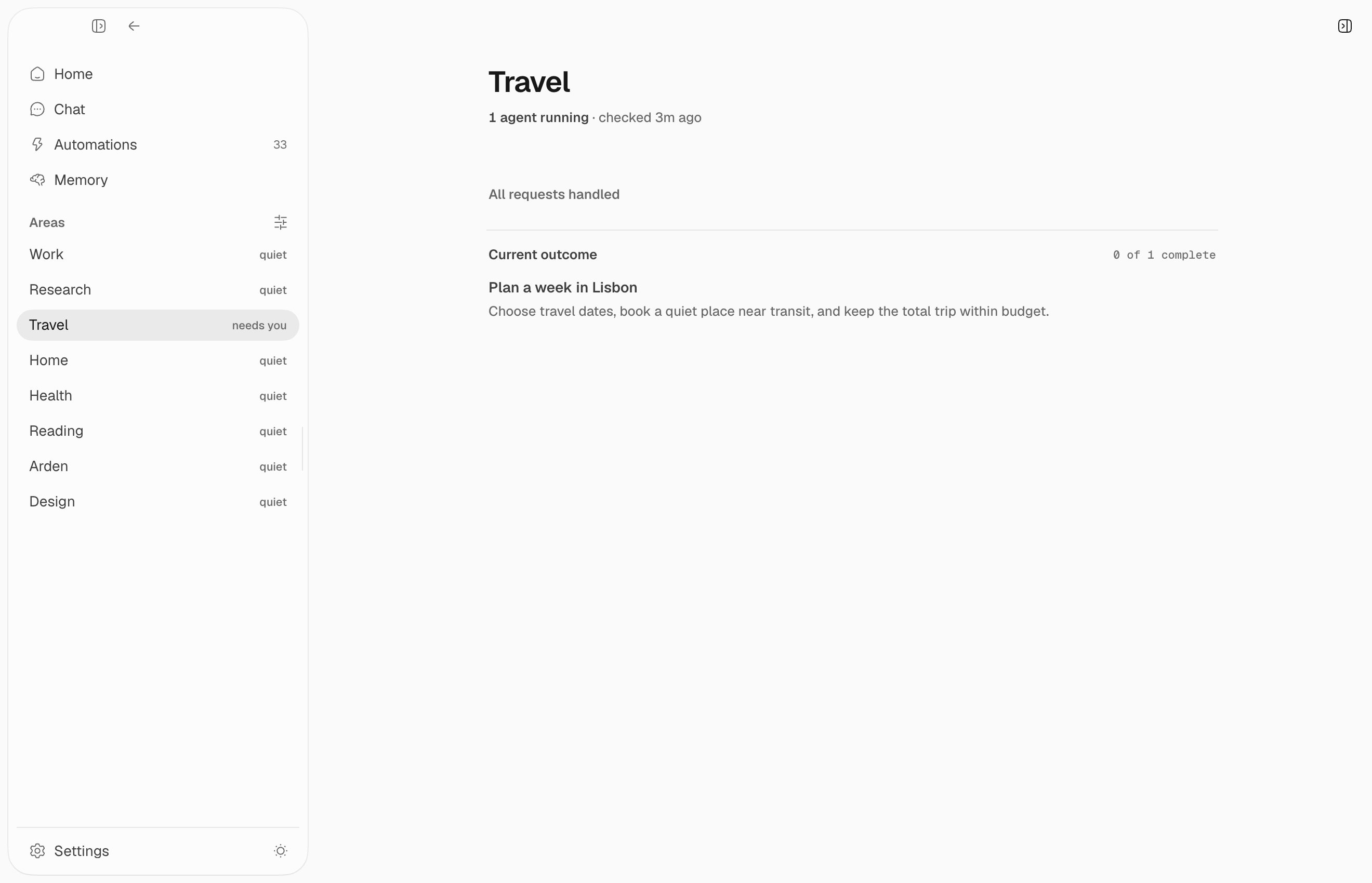 The room shows:
* whether its agent is running and when it last checked
* one request at a time, with a direct action or **Later**
* the current outcome and its completed work
Broader history and activity live in the inspector, so the room stays focused
on what needs action now.
## Standing agent
An area agent is a normal channel automation. You can find it under
**Automations → Area agents**, inspect its transcript, run it now, pause it, or
change its schedule.
It reads the attached page, works toward the current outcome, and reports
evidence, progress, and at most a few useful requests. Stable request keys
update an existing request instead of creating duplicates.
Area agents start in observe mode. They can read context and update their own
area state. Act mode can grant more tools, but risky external actions still
follow normal approval rules.
## Related systems
* [Memory](/guides/memory) stores the page the area and its agent share.
* [Automations](/guides/automations) schedules and runs the standing agent.
The room shows:
* whether its agent is running and when it last checked
* one request at a time, with a direct action or **Later**
* the current outcome and its completed work
Broader history and activity live in the inspector, so the room stays focused
on what needs action now.
## Standing agent
An area agent is a normal channel automation. You can find it under
**Automations → Area agents**, inspect its transcript, run it now, pause it, or
change its schedule.
It reads the attached page, works toward the current outcome, and reports
evidence, progress, and at most a few useful requests. Stable request keys
update an existing request instead of creating duplicates.
Area agents start in observe mode. They can read context and update their own
area state. Act mode can grant more tools, but risky external actions still
follow normal approval rules.
## Related systems
* [Memory](/guides/memory) stores the page the area and its agent share.
* [Automations](/guides/automations) schedules and runs the standing agent.